AI Video Script Generators for Marketing Teams
Marketing teams waste budget confusing script generators with video-producing platforms.

A marketing team signs up for a tool that promises "AI video in minutes" and discovers that what they bought writes scripts, not videos. Another team, chasing brand-voice control over a product launch, licenses a text-to-video platform and gets a finished clip it cannot meaningfully edit to match its brand guidelines. Both teams made a buying decision without knowing that "AI video script generator" now describes two entirely different kinds of product, and that confusion is the single biggest reason marketing budgets get wasted on tools that never should have been compared in the first place. Distribb's August 2026 roundup opens with this exact warning: search for "AI video script generator" and the results mix two completely different products together as if they were interchangeable. One type writes structured text that a human then records, edits, or hands off to a separate production workflow. The other takes a script, a prompt, a URL, or a product photo and produces a finished video, stock footage, AI voiceover, captions, and music assembled without anyone touching a timeline. Knowing which type solves your actual problem has to come before any feature comparison, because the two categories are not competing for the same budget line.
What marketing teams need that solo-creator tools ignore
Most reviews of AI video tools are written with a solo creator in mind, someone publishing one video a week from a laptop, and they evaluate accordingly. Marketing teams work under a different set of constraints, but most tool reviews don't account for them. The first is brand consistency: can the tool hold the same digital avatar, the same color palette, the same fonts and logo placement across dozens of assets produced by different people on different days, rather than just looking right in a single demo video? The second is governance. A marketing team needs shared workspaces, role-based access, and some way to enforce a brand kit across every user who touches the tool, instead of a single login tied to one person's account.
The third constraint is workflow integration, and it tends to be the one that gets discovered only after the contract is signed. A script or a finished video that lives in an isolated tool, disconnected from the CMS, the marketing automation platform, or the channels where the content actually gets published, creates a manual hand-off step that undoes most of the time savings the tool promised in the first place. If the output can't connect to that stack through an API or a native integration, someone on the team has to become the connective tissue, manually downloading and re-uploading files between systems.
The fourth constraint is pricing that holds up at volume. A credit system or a licensing structure can look reasonable at a lower volume, but it can turn hostile at a higher one, especially when failed generations burn credits without producing usable output. Teams evaluating these tools need to model cost at the volume they'll actually run, not at the volume of the demo.
A fifth factor actually decides which product type a team should be looking at before any feature gets compared, and the four constraints above only matter once it's answered: the team's primary use case. A team that needs quick social clips has a different problem than a team that needs presenter-led explainers, and both are different again from a team producing cinematic brand films or repurposing a back catalog of webinars into short-form content. That use case, named honestly, narrows the field before a single feature gets weighed.
Tools that write scripts
Script-writing tools exist to produce the thing a human still has to perform, record, or hand to a production team, and their value sits in prompt control, voice consistency, and the ability for a team to collaborate on that structure before anyone presses record. The output that actually matters from one of these tools is a hook, a scene-by-scene structure, transitions between those scenes, and a call to action specific enough that a presenter can read it straight into a camera. Juma's 2026 roundup names the failure mode directly: most script tools just dump "a block of text that doesn't work for YouTube, Reels, or anything in between," leaving the team to do the structural work the tool should have done.
Juma, formerly known as Team-GPT, comes out as the strongest option for teams in its own 2026 list, built around a structured prompt builder, support for multiple models including ChatGPT, Claude, and Gemini, and real-time collaboration so more than one person can work on a script at once. Its prompt builder asks clarifying questions before generation starts and turns the answers into a structured prompt, so teams get a consistent scene structure even when different people are driving the tool. It also lets a team switch between underlying models for different tones or structures without rebuilding a prompt from scratch, useful for a team that writes in one register for LinkedIn and another for a YouTube explainer.
Claude is rated better for longer scripts in the same list, so it suits a team that produces long-form explainers or webinar-length content. Both share the same gap: neither offers a native collaboration layer built for marketing teams, so the coordination work still has to happen somewhere else.
The rest of the field splits by specialty. Ahrefs produces SEO-friendly, logically structured scripts aimed at YouTube and explainer content. RyRob generates fast outlines with intros, subheadings, and bullet points for creators who need a skeleton quickly. VidIQ builds a full YouTube script package, titles, thumbnails, and descriptions included, rather than just the spoken text. Squibler leans toward narrative, scene-based scripts for story-driven content.
Every one of these tools stops at the same wall. The script is not the video, and no amount of structure in the text changes that fact. Someone still has to record it, edit it, or feed it into a separate platform that turns text into finished footage.
Tools that produce finished video from a script or prompt
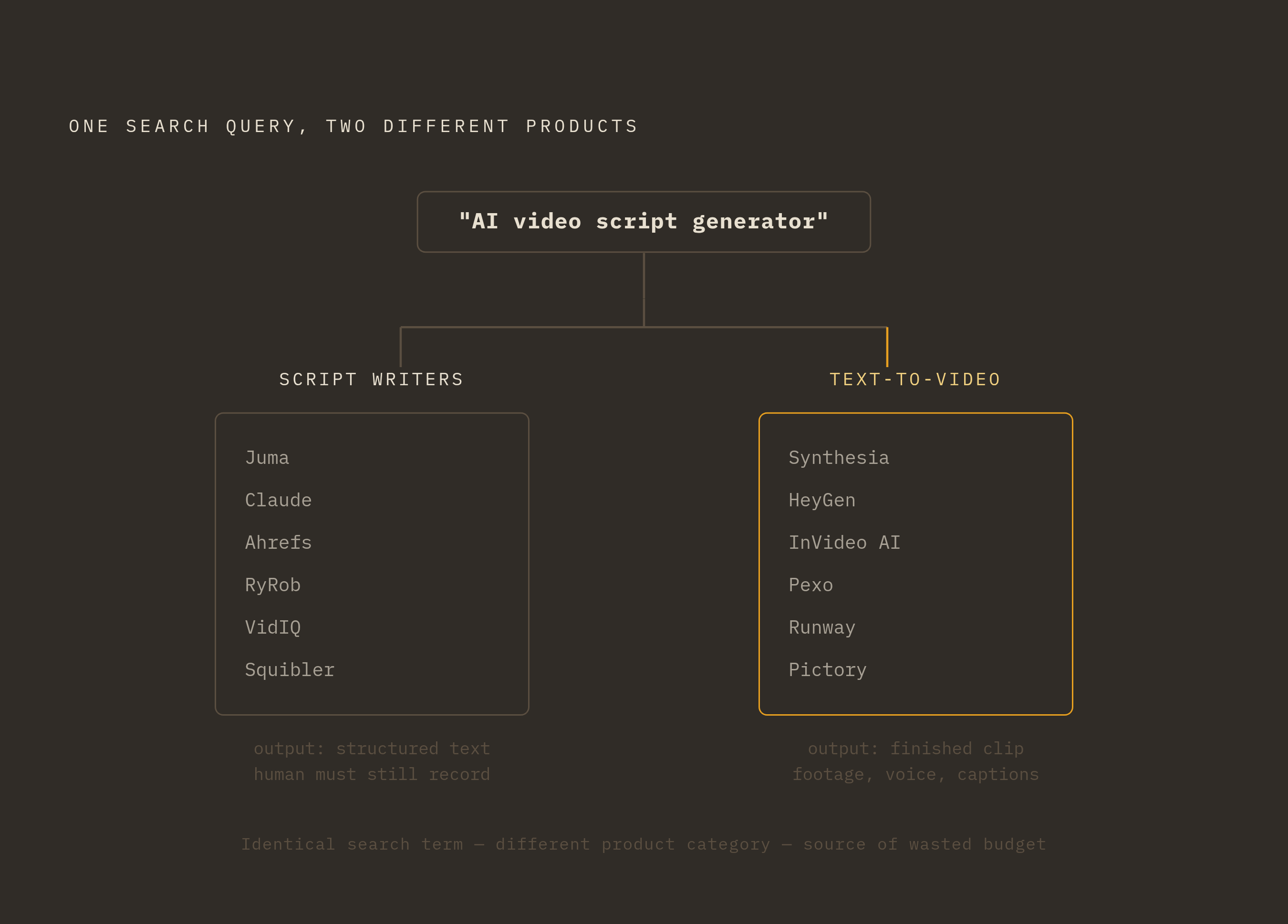
Text-to-video tools don't form one category either. They split into at least four sub-types by output and intended use, and picking the wrong one wastes as much time and budget as confusing a script tool with a video tool in the first place.
Avatar and presenter video is the sub-type Synthesia dominates, named by both Cometly's June 2026 review and AICloudit's August 2026 breakdown as the default choice for enterprise teams. It builds custom avatars, it integrates with screen recording, and it manages a brand kit so dozens of videos stay visually consistent. Synthesia offers both personal and enterprise plans, though it suits presenter-style content more than cinematic storytelling, and its pricing, tiered by monthly minute allowances, can climb fast at volume. If a team needs explainers, product demos, or training content across several languages, it fits enterprise marketing teams and global brands.
HeyGen occupies a related but distinct niche, built for avatar and spokesperson video with a specific edge: video translation paired with voice cloning, and the ability to build a custom avatar from a single photo. It offers API access for marketing automation workflows and real-time avatar streaming for live interaction, with credit-based pricing that scales as volume grows; a free tier exists alongside pay-as-you-go API access, though as of February 2026 there are no free API credits and the legacy Pro and Scale API plans have been deprecated. HeyGen suits sales and marketing teams that run personalized outreach or account-based marketing at scale, and it appears in Juma's 2026 list specifically for avatar-led scripts across more than 70 languages.
InVideo AI serves the social and high-volume end of the spectrum: paste in a prompt or a script and it returns a fully edited video, stock footage, AI voiceover, captions, and music all assembled. It gets you from an idea to a publishable social clip the fastest, with a built-in caption engine and a template library built for marketing formats, but you get less control over fine visual detail, and output can read as template-driven without heavier customization. It's the right tool for social media managers turning briefs into Reels, TikTok clips, and LinkedIn posts on a tight schedule.
Pexo covers a more conversational, low-friction version of the same job. Describe what's needed in plain language, or paste in a product URL or a photo, and Pexo routes the job to whichever underlying model fits, Seedance, Sora, Kling, Veo, or others. No prompt syntax to learn, no manual model selection, pacing and captions and soundtrack handled automatically. That makes it a fit for marketing, social, and SMB teams that need a steady stream of product ads, Reels, and promos without anyone on the team becoming a prompt-engineering specialist.
Runway is the cinematic end of the market, the choice for premium brands and creative agencies that prioritize visual quality in brand storytelling over speed. Its iteration loop and creative controls suit teams that want to refine individual shots rather than just generate them, and it holds up well for hero visuals and brand films. Its limitation is structural: no script-to-video workflow, no branding controls, no caption automation, so what comes out still needs assembly and captioning before it's publishable. It fits teams producing brand hero films or cinematic b-roll where quality outweighs turnaround time.
Pictory covers the fifth sub-type: content repurposing. It takes existing assets, scripts, articles, presentations, webinars, recordings, and turns them into complete videos with AI-generated storyboards, automatically selected visuals, voiceovers, captions, and scenes a team can still edit. Six separate creation workflows feed into the same editor: starting from a script, a URL, an audio file, a PowerPoint deck, a set of images, or a prompt, with its AI Studio stepping in to generate custom visuals when stock footage doesn't fit. AI Studio's image models include Flux, Seedream, Nano Banana, Nano Banana Pro, and Nova Canvas, and its video models include Veo 3.1, Veo 3.1 Fast, and PixVerse 5.5. Pictory fits marketers sitting on a backlog of long-form content who need it converted into short video at scale, and L&D teams that need the same character to stay consistent across a multi-module training series.
None of these tools, across either taxonomy, replaces the strategic layer that decides what gets written, why, and where it needs to show up once it's finished. They produce output. They don't decide what that output should say or where it needs to land.
Connecting script generation to video production in a governed pipeline
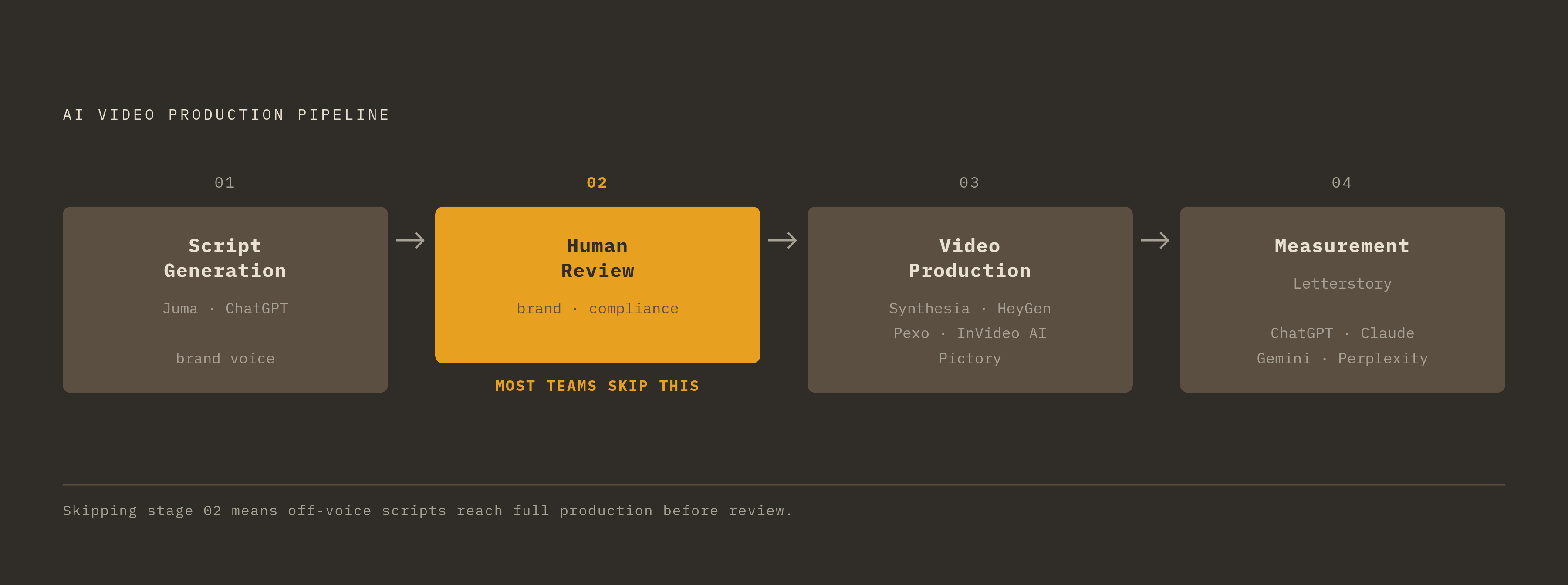
The teams getting real value out of this category rarely rely on a single tool for the whole job. They build a pipeline: a script tool like Juma or ChatGPT produces structured text under a consistent brand voice, a human reviews that text against brand and compliance guidelines, and only then does it move into a production tool like Synthesia, HeyGen, Pexo, InVideo AI, or Pictory, chosen by sub-type for the specific use case at hand. If a team skips the human review step, brand-off-voice scripts can end up fully produced into polished video before anyone catches the problem, and then fixing it means redoing the production work, not just editing a paragraph of text.
The connective layer between the two stages is where most teams underinvest. A script sitting in one tool and a finished video sitting in another, with no shared system tracking which script became which video, which version got approved, or whether the finished asset ever made it into the CMS or the automation platform it was built for, creates exactly the kind of manual hand-off the four constraints warned about earlier. Letterstory works in that layer: it builds the editorial pipeline and measurement system that sits around whatever production tools a team already uses, connecting video content to tracking of whether that content actually gets cited by ChatGPT, Claude, Gemini, and Perplexity. That measurement step matters for a reason specific to 2026: video and the scripts behind it are increasingly a channel for showing up inside AI-generated answers, not just a channel for human viewers, and a pipeline that never tracks that outcome has no way of knowing which of its videos are actually doing that job.
Choosing the right script tool and the right production tool only stops half the budget from being wasted at the start of this piece; connecting the two into a workflow with a review step and a measurement layer turns a tool that produces content into a system that produces content a team can actually account for.