Hidden Costs of AI Writing Tool Subscriptions
Advertised prices mask the true monthly cost of AI writing tools through hidden fees and caps.

The advertised price of an AI writing tool is a floor, not a ceiling, and the distance between what a plan costs on paper and what a team actually pays each month can run into the thousands. Several of the most prominent general-purpose AI assistants cluster around the same monthly price point, which makes comparison shopping feel simple. That clustering makes comparison shopping feel simple. It also happens to be exactly where the trap gets set, because a 2026 cost analysis from Zylo puts actual business spending on AI tools at $100 to $5,000 a month, orders of magnitude past any single sticker price. This piece maps what sits in that gap.
How the pricing structures themselves are designed to obscure total cost
Four pricing models dominate this market: flat subscription, credit or word-based, per-seat, and usage or API-driven. Each one hides its real cost in a different spot, which is worth sitting with for a second, because it means there's no single trick to watch for. There are four.
Flat subscription plans advertise "unlimited" and then quietly cap that word by article count, word count, or which features you're allowed to touch. Credit-based tools let a single article draw from several credit pools at once, generation, SEO optimization, outline building, agent calls, so what looks like one action on the invoice is actually four withdrawals from four different accounts. Per-seat pricing looks perfectly reasonable when it's just one person testing the waters, then stops being linear the moment a second or third teammate joins. And usage or API-based pricing is nearly impossible to budget ahead of time: it's kind to someone running a trickle of requests and brutal to someone running a flood.
The only evaluation standard that survives contact with all four models is cost per publish-ready article, not cost per word and not cost per seat measured in isolation. Most buyers compare headline prices across tools that aren't measuring the same unit at all. That comparison is meaningless before anyone accounts for what's actually being counted.
The billing-cycle penalty and what annual discounts actually cost in flexibility
Paying month to month instead of committing to a year typically runs 20 to 30% more across mid-tier plans, which is a fairly standard SaaS tax. ProWritingAid is the extreme case worth knowing about: its monthly rate of $30 costs three times what the annual plan works out to at $120 a year, one of the widest monthly-to-annual gaps tracked in saaspricepulse.com data.
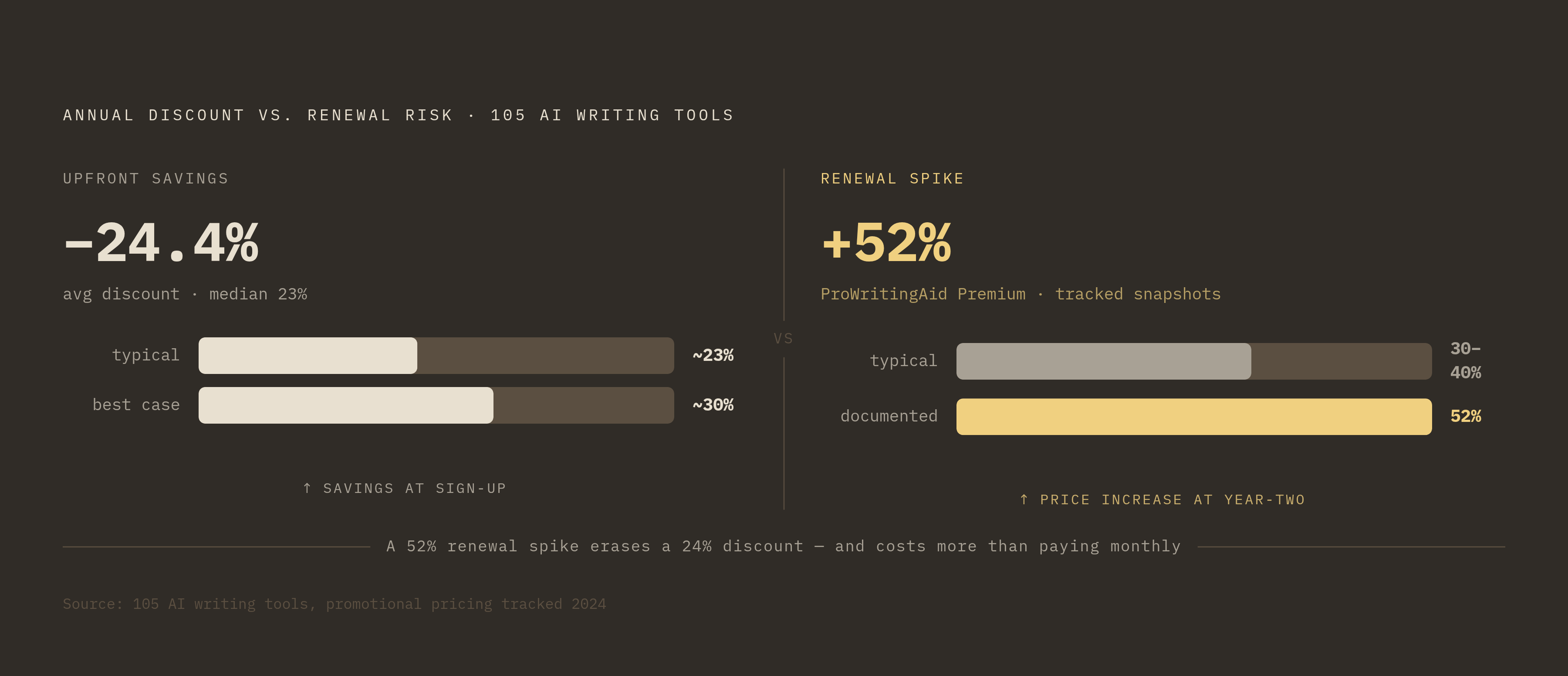
Across a broader set of 105 AI writing tools, the average annual discount comes out to 24.4%, with a median of 23%, roughly two to three months free as an incentive to commit. That sounds like straightforward savings until you notice what it's actually buying the vendor: a year of lock-in during which the pricing can, and often does, move underneath the customer. Promotional first-year rates frequently jump 30 to 50% at renewal. Sharp mid-contract price increases have been documented across the SaaS category, often justified by vendors as reflecting expanded AI capabilities. ProWritingAid's Premium tier rose 52% across pricing snapshots tracked by saaspricepulse.com. When tools do adjust pricing, the change often shows up as a quiet restructuring of credit tiers rather than a headline number anyone would notice right away.
So the annual discount frames itself as a deal. It's also the price of being wrong, paid in advance, about whether the tool still fits in twelve months.
Usage caps and credit systems: how tools monetize the moment teams gain momentum
Across nearly every AI writing tool on the market, the moment that triggers an upgrade isn't a new feature catching someone's eye. It's running out of room mid-month. Frase caps its Basic plan at 30 documents. Surfer SEO caps its Essential plan at a similar ceiling. Hit either ceiling on article number 11 or article number 31, and the choice is an upgrade or a halt to publishing, right when the workflow was finally moving.
Credit systems stack a second layer of complexity on top of that. Surfer SEO alone tracks Content Editor credits, Surfer AI credits, Topical Map limits, Content Audit limits, add-on limits, and on-demand AI credits purchased separately from the subscription itself, each one a distinct counter that can run dry on its own schedule, independent of the others. And Surfer's own tiers show how fast this compounds: $39 a month for Lite (billed annually), $79 for Standard, $199 for Professional, $399 for Advanced. That's a tenfold jump from bottom to top tier, inside one product line.
The structural issue underneath all of it: a flat plan means a heavy user consuming twenty times the median workload pays the same as someone barely touching the tool. Vendors don't fix that with transparent scaled pricing. They fix it with caps, overage charges, and forced tier jumps, which land on the customer at the least convenient possible moment, usually a Tuesday afternoon with a deadline the next morning.
Per-seat charges and how team size transforms a manageable price into an unbudgeted one
Team plans rarely scale in a straight line. Adding two seats to a five-person team can nearly double a bill that looked entirely reasonable when only one person was signed up.
Jasper's Pro tier runs $125 per seat. Writer.com's Starter plan charges $39 per user per month billed monthly, or $29 per user per month billed annually, caps out at 20 users, and permits only 5 custom agents regardless of headcount. Writer.com's published rates for larger teams land around $18 to $25 per user per month on annual billing, with the monthly option running 15 to 25% higher on top of that.
Enterprise pricing tends to vanish into custom quotes entirely, somewhere in the range of $500 to $5,000-plus a month, usually with an annual contract attached and no public rate card to check the number against. Organizations building on APIs face a separate cost stack again: Writer.com's API pricing includes token-usage fees for LLM calls and separate storage or data-extraction fees for its Knowledge Graph, and large deployments can clear $500,000 annually, with some contracts reaching seven figures.
The mistake, and it's an understandable one, is evaluating the per-seat number as if it applies to one person, then multiplying by headcount only after the contract's signed.
The workflow gap: what the subscription doesn't include but the job requires
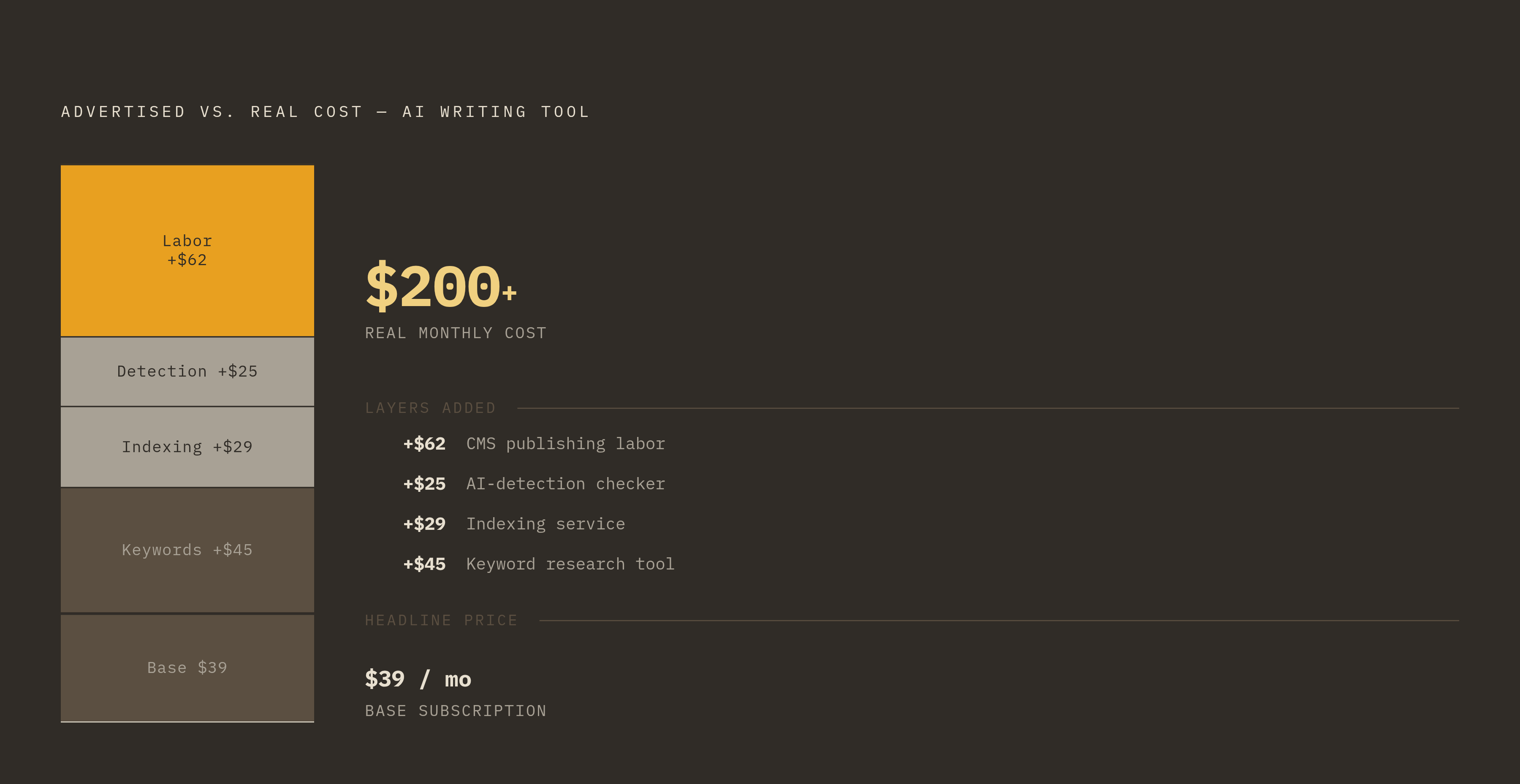
A $39-a-month AI writer rarely ships an article on its own. Add a keyword research tool, an indexing service, an AI-detection checker, and manual publishing into a CMS, and that $39 tool is now anchoring a $200-plus monthly operation, even though the invoice for the writing tool itself never changed.
Entry prices often don't include the AI capability that made someone sign up in the first place. "AI add-on" upsells, per-resolution billing, and premium model access are the standard mechanisms by which a low headline price turns into a much higher real one. Notion AI is the cleanest example of this: AI runs $10 per member per month, but that's stacked on top of a separate Notion workspace plan priced at $10 to $20 per member. The AI cost is an add-on to an add-on, which is a strange kind of pricing origami but a common one.
Free tiers do their own version of this work. Hitting a word limit or feature wall mid-project doesn't feel like a choice to upgrade, it feels like a wall the project ran into, and the workaround (switch tools, copy-paste between two apps, wait) costs real time even when it doesn't cost real money. Most major providers have tightened their free-tier limits over time, and both of which make the paid tier feel less like an option and more like the only way through. Across the category, 69.9% of AI writing tools start under $29 a month and 83.5% start under a modest monthly threshold, but those entry prices routinely leave out SEO functionality, collaboration features, brand-voice controls, and CMS integration, the exact pieces a real production workflow needs.
Human editing time: the cost that never appears on a pricing page
A tool that drafts a piece in 30 seconds and then needs 45 minutes of human editing hasn't saved anyone 45 minutes. It's just moved the clock from one column to another.
AI output isn't publishable the moment it's generated, not reliably. Fact-checking, restructuring for logic and flow, an SEO pass, and correcting the tone to match a brand voice are all real labor that follows every single generation, whether or not the invoice accounts for it. So the true cost per article has to include the fully-loaded editing time of whoever reviews the draft, not just the subscription fee divided across a article count. That's a very different number.
This is roughly where strategy-first tools start to separate from generation-first ones. A tool that applies an editorial framework, a brand-voice guide, and SEO intent before it generates a word tends to produce something closer to done, which cuts down the editing load on the back end. A tool that generates first and leaves the thinking for later just shifts that cost onto whoever's stuck fixing it, and that person's time isn't free even if nobody's tracking it against the AI subscription line.
Onboarding stacks on top of that. Workflow changes, staff time spent learning a new interface, and the general friction of adapting a team's habits to a new tool are real expenditures that never show up in a pricing comparison chart. And the terminal version of this problem is migration: a $49 tool a team outgrows in 60 days doesn't just cost $49. It costs the subscription, the cost of moving everything out, and the hours a team spent learning a platform that turned out not to fit.
How to calculate what a tool actually costs before signing up
Start with the unit that actually matters here: cost per publish-ready article, not cost per word and not cost per seat counted on its own.
From there, build the full cost stack before comparing anything. That means the base subscription at the tier a team will realistically use, not the cheap entry plan meant to get someone in the door. It means per-seat cost multiplied by actual headcount, not the solo price. It means every add-on required to finish a workflow, SEO tools, brand-voice settings, CMS integration, AI detection. It means the billing-cycle premium if the plan is monthly rather than annual, the likely cost of an upgrade if current usage sits near the plan's cap, and editing or review time per piece multiplied by realistic monthly volume.
Before signing anything, it's worth asking a vendor directly what happens when the credit or article cap gets hit mid-month, which features are genuinely included at this tier versus sold separately as add-ons, what the renewal price looks like once the promotional period ends (not the number on the landing page), and whether API access gets metered on its own separate track.
The tools that hold down total cost most reliably tend to be the ones that collapse the workflow stack instead of expanding it, combining strategy, generation, editorial review, and brand alignment in one place rather than making a team stitch together five separate subscriptions to finish one article. Platforms built around a strategy-first approach, where a brief, brand context, and SEO intent shape the draft before it's written rather than after, cut down the editing cost that ends up dominating the real number. This is where a purpose-built content marketing platform like Mia earns a place in an honest comparison, not because it drafts faster than anything else, but because it reduces the correction work waiting on the other side of the draft.
Across the 105-tool dataset referenced earlier, the median cheapest plan runs $19 a month and the median most expensive public plan runs $64. Somewhere inside that range is a reasonable number for most teams, but only if the tool's workflow coverage actually earns it against the full cost stack, not just the number printed at the top of the pricing page.