AI Content Workflow Tools for In-House Marketing Teams
Teams need orchestration to turn scattered AI tools into a repeatable, governed system.
Nearly every marketer now uses generative AI somewhere in their workflow: 87% do, as of 2026, up from 51% just two years earlier, according to Salesforce's State of Marketing research. But adoption and integration are two different animals entirely. Most of that usage is still one person, one chat window, one prompt at a time, with nothing shared, nothing repeatable, and nothing governed, per research from Nguyen, Langan, and Anderson out of Cal State LA and USF. The tools have multiplied (the marketing AI landscape grew from roughly 1,200 products in 2024 to more than 3,800 by 2026) but more tools scattered across a team without a shared structure just means more places for brand voice to drift and quality to wobble. The real question this piece sets out to answer isn't which AI tool to buy. It's whether the tools a team already has are wired together into something that functions like a system, rather than a junk drawer of point solutions each doing its own thing.
What a content workflow actually is, and what makes it "AI-powered" in a meaningful sense
Strip away the buzz and a content workflow is just the sequence of steps and systems a team relies on to plan, make, check, and ship content. AI sits inside that sequence. It doesn't replace it, and it definitely isn't a synonym for "someone opened ChatGPT."
Two structural patterns show up across teams that have actually thought about this. Task-based workflows map every step, from idea to post-publish analysis, to a specific person or system responsible for it. Status-based workflows track each piece of content by where it sits at any given moment, treating the editorial calendar less like a spreadsheet and more like a live control panel showing what's drafted, what's in review, what's approved, and what's stuck.
What separates a workflow that happens to use AI from one that's genuinely AI-powered comes down to four things: shared inputs everyone pulls from, shared prompts instead of everyone reinventing their own, human review gates placed at defined points, and actual integration with the systems downstream. Speed alone doesn't qualify. A team that drafts faster but still can't tell you who reviewed what, or why one blog post sounds nothing like the last one, hasn't built a workflow. It's built a faster version of chaos.
Worth separating out here: orchestration platforms like Zapier, Make, n8n, and Workato, whose entire job is routing information between systems, versus generation tools that sit at one step and produce content. Confusing the two is a little like confusing the conductor with the trumpet section. Both matter, but only one of them is keeping everyone on the same beat.
The frontier past all this is agentic workflows, where the system itself watches the pipeline and acts without waiting for a human to click "go." A growing share of enterprise marketing teams now run at least one autonomous agent in production. The larger point standing behind all of it: a workflow is an architecture, not a product you buy off a shelf. Tools are the components. The architecture is what a team has to actually design.
The four stages most teams move through, and where they stall
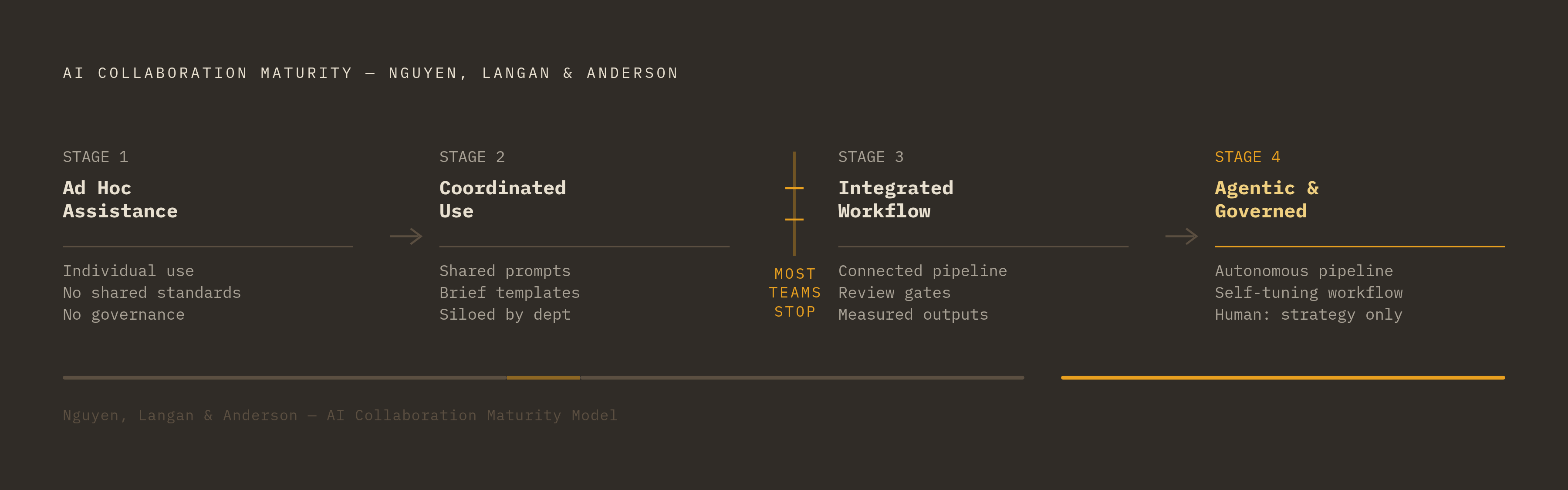
Nguyen, Langan, and Anderson's AI Collaboration Maturity Model lays out four stages teams tend to pass through, assuming they progress at all.
Stage 1 is ad hoc assistance: individuals use AI on their own initiative, with no shared standards and no governance layer watching over any of it. This is where most teams sit today, whether they'd admit it or not. Without shared standards, output consistency is left entirely to individual judgment rather than any structured input.
Stage 2, coordinated use, introduces shared prompts and brief templates, and output gets noticeably more consistent, though it's still siloed by department; the social team and the blog team might each have their own version of "coordinated" that doesn't talk to the other's.
Stage 3 is integrated workflow: planning, production, review, and publishing are connected, review gates are explicit rather than implied, and performance gets measured against workflow outputs, not just how much content got produced. Stage 4, a fully agentic and governed state, is where AI monitors the pipeline and triggers actions on its own, the workflow tunes itself over time, and human attention concentrates almost entirely at the strategic and editorial judgment calls, rather than being spread thin across execution.
Most teams get stuck between Stage 2 and Stage 3. Tools get added, but the hand-offs, the approval gates, the shared inputs that would actually turn a pile of tools into a system, never get formalized. The common failure mode underneath that stall: fragmented data and governance gaps mean the hand-offs, approval gates, and shared inputs that would turn a pile of tools into a system never get formalized.
How the workflow breaks down without orchestration at the center
Orchestration is the connective tissue. It routes content from tool to tool, assigns status, triggers reviews, and flags where something's stuck. Remove it and every tool becomes its own island, doing its job in isolation and reporting to no one.
Without that center, a few things reliably go wrong. Bottlenecks pile up uncontrolled, especially at approval stages, where content can sit for an oddly long time simply because nobody's watching the queue. Velocity gets erratic instead of steady: five blog posts might go live on the same day despite having been started months apart, because status was invisible and nobody had clear ownership of the calendar. Time-sensitive content, the kind tied to a launch date or a news cycle, can slip past the point where it's even useful anymore.
The scale of the integration problem shows up in the numbers too: a large majority of enterprises report trouble integrating AI with their existing systems, according to Zapier research cited in industry guidance. That's not a training issue that a workshop fixes. That's structural, baked into how the systems were stitched (or not stitched) together in the first place.
There's a sharper risk specific to AI in particular. It generates quickly, and it does not understand nuance, positioning, or the kind of strategic trade-off a seasoned editor makes without thinking twice. Without human judgment sitting at the right checkpoints in the flow, output drifts toward the generic, and generic is the fastest route to sounding off-brand.
For teams under about 20 marketers, the typical progression pairs a connector tool with a standalone generation tool and some kind of governance layer bolted alongside it, then graduates toward a fuller platform as the content operation grows more complex. That progression is worth planning for on purpose rather than backing into by accident. And there's research backing the underlying instinct here: when human-AI collaboration runs on clear goals, shared responsibility, and real oversight, it outperforms both AI working alone and humans working alone, per Arora et al. (2025), cited in the Cal State LA paper. Neither extreme wins by itself. The middle, done deliberately, does.
Building the brief and planning layer: where structured AI workflows start
Everything downstream depends on the brief, and a weak brief cannot be fixed by careful editing later. If AI generates from vague or thin inputs, no amount of polish afterward recovers the strategic alignment that should have been there from the first sentence.
An AI-ready brief needs SEO keywords, a brand voice guide, audience personas, competitor context, campaign goals, and messaging pillars, treated as structured inputs rather than loose notes tossed into a conversation. Audience research and keyword analysis belong inside the workflow as a repeatable step, not a one-off task someone does from scratch every single time; AI-assisted persona development and search-gap analysis should feed the brief automatically.
Some tools can now turn those structured inputs into a one-page, actionable brief on their own, which quietly removes one of the more common sources of downstream bottlenecks: briefing inconsistency, where two campaigns for the same brand start from two entirely different sets of assumptions.
Worth documenting the moment a prompt actually works well: prompt libraries organized by workflow stage function as a governance artifact, not a nice-to-have extra. Every team member touching that stage should be pulling from the same well, not reinventing the wording from memory.
Calendar optimization deserves a seat in the planning layer too. Analyzing engagement patterns and publishing schedules should happen before drafting starts, not as some separate tool decision made after the fact, almost as an afterthought. And brand governance itself begins here, in the brief, not later in review. The voice guide, the competitor parameters, the persona alignment: these are inputs at the start of the line, not corrections stapled on at the end.
The production layer: generating at volume without losing editorial quality
The speed gains from AI in production are real and reasonably well documented. A 1,500-word blog post that used to take 8 to 10 hours dropped to under 2 by late 2025, per research from Zigment AI, and teams that have operationalized their tools correctly are seeing roughly a 60% average cut in creation time, according to a 2025 State of Marketing report.
But speed without upstream structure just produces garbage at warp speed: more content, faster, and just as forgettable as before. Briefing an AI tool the way a manager would brief a new hire, with specifics on role, format, tone, audience, and context, produces drafts that move straight to editing instead of drafts that need a full rewrite.
Channel variation belongs in production, not tacked on afterward. Generating a LinkedIn version, an email version, and a landing-page version from the same brief should happen as part of the same pass, not as separate work assigned once the primary asset already has sign-off.
Creative development is the most common AI use case in marketing right now, with 77% of GenAI-using marketers applying it there, per Gartner's CMO Spend Survey 2025. Most teams are already standing in this layer. What's missing isn't the tool, it's the structure wrapped around it. An outline-generation step, sitting between planning and drafting, helps keep structure consistent and coverage complete before generation even starts.
And production isn't just text anymore. 62% of marketers report using AI for text generation, and 45% for image or video, per Cashion and O'Brien (2024), which means a real workflow has to handle multiple asset types rather than assuming "content" means one thing. Production is the layer most teams already have built out reasonably well. It's the layers before and after it that decide whether it holds up at scale.
The review and approval layer: where brand governance either holds or breaks
Skip explicit review gates, and AI-generated content ends up in one of two bad places: published without real editorial judgment, or stuck in an informal approval loop that quietly eats up all the time saved earlier in the process. Consistency doesn't come from the generation tool. It comes from whatever sits watching at review.
A functioning review layer does four things. It checks brand voice and style, automated where that's realistic and handled by a human where nuance actually matters. It verifies the piece still lines up with the original brief, since drafts have a way of drifting from intent as they get revised. It routes each piece to the right reviewer at the right stage, since not every piece needs every set of eyes on it. And it timestamps and logs decisions, so the team can look back later and see what changed and why, rather than relying on someone's memory of a Slack thread from three weeks ago.
Some enterprise platforms already model this kind of connected architecture, linking strategy and planning to execution, automating the review and approval steps, and giving visibility across the whole content lifecycle rather than just one slice of it. That's worth studying as an architecture pattern, whatever specific tool a given team lands on. The approval layer is also where legal and compliance sign-off needs to live for enterprise teams with 20 or more content creators and strict brand requirements, built into the flow from the start rather than bolted on right before something ships.
Human judgment doesn't get optional here. AI cannot weigh a strategic trade-off, read positioning nuance, or sense audience sensitivity the way a person can, which is exactly why review is where the human role concentrates rather than disappears. Research from Bain & Company in 2025 found that structured AI workflows cut content creation time by 30 to 50% at companies that actually invested in grounding and governance. Governance, not the generation tool, is the variable separating the teams pulling ahead from the ones treading water.
The publishing and distribution layer: connecting approved content to downstream systems
Publishing is where the cracks in a workflow finally show themselves in daylight. Content sits fully approved but never actually goes out, or it ships without the distribution steps, the social scheduling, the email triggers, the SEO metadata, that make it perform once it's live.
A real workflow doesn't end at the CMS publish button. Channel-specific distribution, metadata, UTM parameters, and scheduling all belong inside the workflow as defined steps, not as manual chores someone remembers (or forgets) to do after the fact.
Content refreshing deserves a place in this layer too. Automated audits that flag outdated pieces should feed straight back into planning, which is the detail that turns a workflow from a straight line into an actual loop, one that keeps circling back and improving rather than just marching forward once.
This is also where the growing share of enterprise teams running autonomous agents are putting them to work: monitoring the pipeline, watching for triggers, and acting on downstream tasks without waiting on a human to initiate. Integration depth matters here more than almost anywhere else in the workflow. The stronger platforms connect to existing CRM systems and give visibility across departments, which is what lets content finally connect to revenue tracking instead of floating somewhere above it, unmeasured. And personalization, segmented sends, dynamic content, at the distribution stage is one of the clearest places automation actually pays for itself: the vast majority of marketers report that automation has helped save time and scale personalization efforts.
The tools that run each layer, and how to evaluate them as system components
Here's the question worth asking about any tool under consideration: not "is this the best tool," but "which layer of the workflow does this fit, what does it connect to upstream and downstream, and does it scale with the team's size?" A tool that's excellent in isolation and terrible at integration will eventually cause more problems than it solves.
Jasper sits primarily in the production layer, generating content with brand voice governance built into the tool itself. It offers brand voice training, marketing-specific templates, and team collaboration features, and it's compatible with Surfer SEO, though the native integration between the two was discontinued in 2025, meaning that connection now requires a manual workaround. Pricing starts at $49 a month for a single creator, with a Teams plan around $125 a month covering up to three seats, including brand voice, SEO mode, and campaign workflows. It fits mid-size B2B marketing teams and companies under roughly 200 employees running collaborative campaigns, and works best when the brief and review layers are handled by something else built around it, rather than expecting it to cover the whole workflow on its own.
Writer.com operates more as a governance layer, built to integrate into an existing tech stack rather than function as one more standalone app added to the pile. It offers custom LLMs, compliance certifications, and enterprise-grade brand governance, with pricing that's typically custom but starts at a low per-user monthly rate for teams. It's best suited to enterprise marketing teams of 20 people or more managing content across multiple departments with strict brand requirements, functioning as the governance and review layer for large organizations rather than replacing the tools already in place.
Notion AI lives in the planning layer, embedded directly into the tool teams already use for briefs and internal documents. It handles AI-assisted writing and editing, intelligent search, automatic meeting note summaries, database autofill, and email drafting through Notion Mail, a separate AI-powered email client. It runs on GPT-5 and Claude Sonnet 4 models (with Claude Opus 4.6 available for Agents, selectable per agent), and comes fully included on the Business plan at a modest per-user monthly rate billed annually. It fits teams already living inside Notion who want AI support at the planning stage. It isn't built to replace a dedicated content generation tool, and treating it as one would be asking a filing cabinet to also write the memos.
None of these three tools does everything, and none of them should. The workflow is what stitches them together into something coherent. Buy the pieces with that architecture already in mind, and the system holds. Buy them one at a time because each one looked impressive in a demo, and eventually there's just a very expensive pile of tools that don't talk to each other, which is, in a way, exactly where this article started.