Automating Content Repurposing From Blog to Social
Turn one blog post into eight social assets without rewriting anything.

Publish a post once, share it once: that habit throws away most of what the post is worth. A 1,500-word article typically holds enough material for 8 to 12 separate social posts, and most teams pull out one. That is a significant inefficiency. It's the single biggest waste of effort in most content operations, and it's fixable without writing another word.
The math isn't complicated. Orbit Media's Annual Blogger Survey, published in August 2025, put the average time to write a blog post at 3 hours and 25 minutes. That time gets spent once: researching, structuring, drafting, editing. Spend it, then collect the return in a single afternoon of link-sharing, and the rest of that 3-plus hours just evaporates. Spread the same output across 8 to 12 platform-specific assets over a week, and the fixed cost of writing the post stretches across far more surface area, without redoing any of the research.
Cloud Present's 2025 repurposing guide puts a number on it: a post over 2,000 words typically contains 5 to 10 standalone insights, each one capable of working as its own LinkedIn post, X update, or Instagram carousel. That material already sits on the page. It just hasn't been pulled apart yet. Content Marketing Institute reported in 2024 that repurposing content into multiple formats increases reach by roughly 12x compared to single-format publishing, while Curata found that repurposed content costs around 80% less than building new content from scratch for every channel.
None of this argues for writing more. It argues for collecting on work already paid for.
What repurposable assets actually live inside a blog post before any tool touches it
Before any automation layer touches a post, someone, or something, has to look at the draft and figure out what's actually worth pulling out. Skip that step, and the output reads like a thin summary of the original, missing whatever made the piece worth reading in the first place.
Most well-built posts carry five kinds of reusable material. Standalone statistics or data points make natural quote graphics for Instagram or X. Step-by-step sections translate cleanly into carousels for LinkedIn or Instagram. A sharp opinion or a contrarian argument becomes a text post or a thread built around defending one claim. A full process walkthrough, with a beginning, a middle, and an end, works as a short video script for TikTok or Reels. And summary paragraphs, especially the ones near the top or bottom of a post, often contain self-contained ideas that can be adapted for other formats downstream.
The mix shifts depending on what the post actually is. A piece built on original research or data skews toward quote graphics and threads defending one number. A tutorial-style post skews toward carousels and video scripts. No fixed template applies evenly across every article, and forcing one produces assets that feel bolted on rather than pulled out.
A workable extraction method treats each subheading as a candidate caption, each statistic or pull quote as a candidate graphic, and each numbered list as a candidate carousel or thread outline. Judgment still matters after that: not every section deserves its own post. The test is whether an idea holds up on its own, without the paragraphs before and after it propping it up. If a stat or claim needs the whole article's context to make sense, it isn't a repurposing candidate yet.
The output of this stage should look like an inventory, not a vague sense that there's probably something here: three quote graphics, one carousel outline, two thread angles, one Reel script. That inventory becomes the input for everything after it.
How each platform's format logic changes what the same idea needs to say
The most common mistake at this stage is treating repurposing as resizing. Paste a blog excerpt straight into LinkedIn and it reads like a press release. Trim that same excerpt down for X and the argument goes missing in the process of getting shorter, because compression without restructuring just cuts words. It doesn't rebuild the point.
Each platform runs on its own format logic. LinkedIn rewards a professional hook paired with a specific data point, or an opinion post that states a bold claim early and spends the rest defending it; the platform tolerates, even rewards, full paragraphs and context. X works differently: a thread has to walk through evidence step by step, with punchy, numbered takeaways, and the character limit forces a kind of prioritization that longer formats let a writer avoid. Instagram is a visual medium first, so a carousel needs a cover slide carrying a strong claim on its own, with the caption supporting the image rather than repeating it. TikTok and Reels run on the shortest fuse of all: the script needs a hook inside the first two seconds or the viewer is gone. Video's pull here isn't theoretical, either. A large share of marketers named video their top-performing content format in 2025, and nearly half said short-form video specifically delivered the highest ROI of any format they used.
Tone shifts right alongside format. LinkedIn rewards professional authority. X rewards directness bordering on bluntness. Instagram rewards personality and visual storytelling over polish. One piece of source material has to get rewritten for each of these registers, not just reshaped.
That has a direct consequence for how the automation layer gets instructed. A prompt that says "shorten this for X" produces a compressed version of the original, nothing more. A prompt that says "rewrite this as an X thread walking through the evidence step by step" produces something built for the platform, structurally different from the source rather than trimmed to fit it. Most one-click repurposing tools stop at the first version, resizing content instead of re-arguing it, which leaves the real gap in this whole category.
The automation pipeline: how the workflow moves from blog URL to platform-ready asset
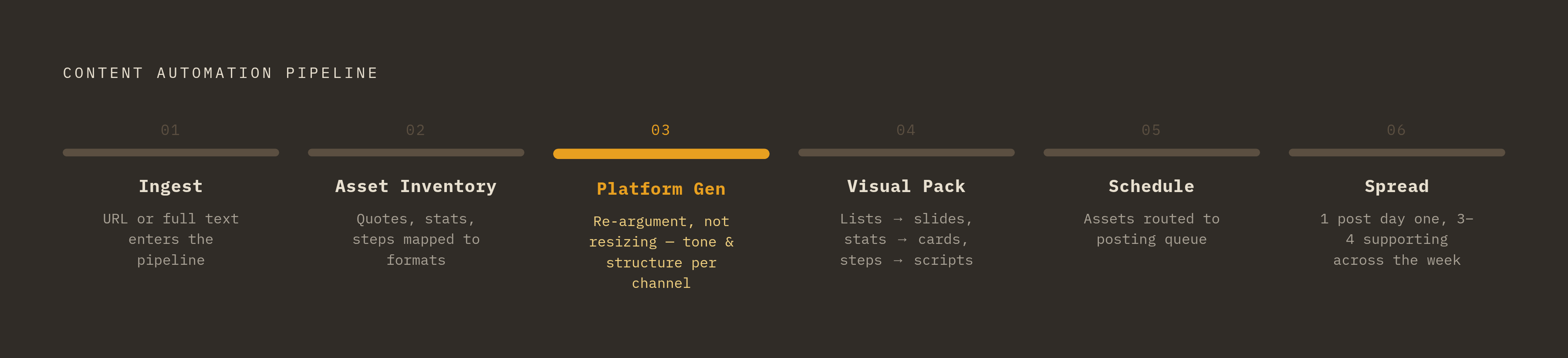
The pipeline runs in six stages, and each one depends on the one before it working correctly.
Ingest comes first: a blog URL or the full text feeds into the repurposing layer, which reads the piece, identifies its core argument, pulls out key sections, and surfaces the statistics worth extracting. From there, the system builds a structured asset inventory, the automated version of the manual extraction process above, mapping quotes, stats, steps, and contrarian angles to candidate formats.
Platform-specific generation follows. For every asset in the inventory, the system applies a set of platform parameters (tone, format, length, structural convention) and produces a draft variant for each channel. This is where the re-argument work happens, not a resize.
Visual packaging comes next, where it applies. Numbered list sections become carousel slides. Statistics and pull quotes become quote cards. Walkthrough sections turn into video scripts, then get formatted for the right aspect ratio and captioned; tools like Typeface's Video Agent handle the clipping, captioning, and aspect-ratio work needed to get long-form footage into a social-ready shape. Lumen5 takes a different route into video, converting text-based source material directly into video output without starting from a script at all.
Scheduling and distribution follow generation. Finished assets get routed into a posting queue timed to when the relevant audience is actually active, and tools such as Repurpose.io, Quso.ai, and Predis.ai handle the cross-channel scheduling and auto-posting.
Then comes spread, the pacing decision that separates a working pipeline from a spam cycle: one core post per platform on day one, followed by three or four supporting posts spread across the following week, all drawn from the same source article rather than dumped all at once.
Speed isn't the reason any of this matters. Consistency is. The pipeline runs the same extraction and formatting logic every time a post publishes, without depending on someone remembering to go back and repurpose it a week later.
Choosing tools that fit the workflow rather than building the workflow around a tool
Most teams get this backwards: they assemble a stack of tools first, then force a workflow to fit around them. That's the wrong order, full stop, and it produces tool sprawl, gaps between stages, and outputs that don't match in tone or format from one platform to the next. Buy the workflow, not the tools, and design it before shopping for pieces to fill it.
The right question for any tool under consideration is narrow: what single stage of the pipeline does it handle, and does its output connect cleanly to whatever comes next? A tool that generates great LinkedIn copy but can't hand that copy off to a scheduler without manual copy-pasting just moves the manual labor to a different step in the process.
On the text-to-social side, Semrush's AI Social Content Generator repurposes blog content into social posts, offering multiple script variants per blog URL along with captions and hashtags. Predis.ai turns content into platform-ready posts and includes auto-posting, content calendars, and scheduling in the same product. Publora handles cross-platform posting through an API and a natural-language interface, distributing to as many as ten platforms from one input.
On the text-to-video side, Lumen5 converts articles and blog posts into video straight from written content. Semrush's AI Video Marketing Automator repurposes blog content into YouTube, TikTok, and Instagram video, priced at $39 a month for its Basic plan and $119 a month for Pro. Typeface's Video Agent searches long-form video for key moments and packages them for social with captions and correct aspect ratios already applied.
For scheduling and distribution specifically, Quso.ai and Repurpose.io both automate cross-platform posting, distributing content at optimal times based on audience activity.
Agencies running this across multiple clients face an added requirement: a workspace that keeps client outputs separate while running the same pipeline logic across every account, with per-client access controls, consolidated analytics, and white-labeled reporting. Some platforms address that exact problem with a single repurposing workflow running across an entire client portfolio, with granular per-client controls and exportable performance data rather than a separate setup for every account.
The goal isn't piling up tools. A three-tool stack that reliably covers ingest, generation, and scheduling beats a six-tool stack with gaps between each handoff, every time.
The two failure modes that automation does not fix on its own: brand voice and performance feedback
Automation solves for consistency and speed. It doesn't solve for sounding like a specific brand, and it doesn't tell anyone whether the output actually works.
The first failure shows up as generic output. Without brand voice built into the generation step, repurposed content comes out structurally sound but tonally flat: correct format, wrong personality. That's the most common complaint leveled at repurposing tools once they run at scale, content that's technically fine and instantly forgettable. Editing tone in after the fact doesn't fix it, either. Brand voice has to get encoded as a parameter before generation happens, not patched on afterward. Platforms like Typeface let brand guidelines train directly into the generation layer, and tools such as RepurposingBot offer a range of distinct writing styles specifically to dodge the flattened, interchangeable feel that generic AI output tends to have.
The second failure is quieter, and it does more damage over time: no performance loop. Generating and scheduling content is only half the job. Without tracking which asset types and which platforms actually drive engagement, the whole pipeline optimizes for volume, more posts, more platforms, with no signal about which of those posts are worth the effort. The recurring failure patterns in pipelines like this are well documented: tool sprawl, inconsistent tone across channels, improper performance monitoring. These aren't rare mistakes. They're the default outcome of running a pipeline with no way built in to check its own results.
There's real upside on the table once that loop closes. Research indicates that a majority of marketers report repurposed content generates more leads than original content does. That number depends on someone actually watching what performs and feeding it back into the extraction and formatting logic. The pipeline running on its own doesn't get you there.
Two points in the process still need a human, and neither is optional. Brand voice needs review before anything goes live. Performance data needs a person to interpret it and adjust the system's defaults over time. The goal is minimal manual intervention, not zero judgment.
Why a consistent repurposing cadence now affects how AI systems cite and surface a brand
Where people go looking for brands is shifting, fast enough that repurposing cadence now carries weight well beyond social engagement metrics. Similarweb's 2025 Generative AI report put AI chatbot referral traffic at 1.1 billion visits in June 2025, up 357% year over year. Discovery increasingly happens inside AI-generated answers, not a list of ten blue links.
That shift comes with a wrinkle worth naming directly: ranking well in Google no longer guarantees showing up inside an AI-generated answer. Ahrefs data from 2026 found that only 38% of AI Overview citations come from pages that rank in Google's own top 10 results. A brand can hold a strong search position and still stay functionally invisible inside an AI Overview or a chatbot response.
Repurposing connects to that problem in a few specific ways. Pages left unrefreshed are more likely to lose their AI citations over time, which ties directly to a repurposing cadence that keeps reformatting and republishing core ideas instead of letting a post sit static after launch. Separately, nearly half of social media marketers share repurposed content across platforms with only minor adaptations, which means distributing repurposed content onto those surfaces extends a brand's citation footprint well past its own domain. And a large share of brand mentions inside AI search results come from third-party pages rather than the brand's own site, so the carousels, threads, and social posts spread across platforms are quietly building exactly that third-party presence.
Firebrand Marketing's 2025 GEO best-practices guide makes the connection explicit: content reformatted into carousels, threads, and explainers works as a real-time reinforcement layer for a generative engine optimization strategy. Call it an AI visibility tactic wearing a familiar coat: a blog-to-social workflow that runs on a steady cadence, keeps content fresh, and spreads it across multiple surfaces has become a core distribution engine, whether a team set out to build one or not.
For agencies, that's the argument clients actually need to hear. The same repurposing workflow filling out a content calendar is simultaneously building the citation surface that decides whether a client shows up inside an AI-generated answer at all. Some analytics tools make that connection measurable, showing where a brand surfaces in AI conversations and whether repurposing activity moves that needle over time.
Building the repurposing system so it runs without a project manager holding it together
A workflow is a sequence of steps. A system is that same sequence with triggers, defaults, and feedback loops built in, so it keeps running without someone restarting it by hand every time a new post goes live.
Four decisions turn a workflow into a system that sustains itself. Trigger logic decides what pulls a new post into the pipeline automatically, a publish event, a CMS tag, an entry on the editorial calendar, rather than someone remembering to kick it off by hand. Asset defaults set a pre-built extraction template for each post type or topic category, so the system knows which asset types to generate without manual configuration every single time. Review gates decide which outputs need a human check before they go live (brand-sensitive material, client-facing content, anything landing on a high-stakes platform) versus which content can publish on its own. And a feedback loop, checked weekly or per post, tracks which asset types and platforms actually generate engagement, feeding that data back into the extraction templates instead of waiting on some distant quarterly review to catch up.
There's a refresh dimension worth building in too. Orbit Media found that bloggers who go back and update old posts are 2.5 times more likely to report strong results than bloggers who never touch existing content again. The system needs a trigger for refreshing evergreen posts, not just one for new posts coming off the press.
Agencies running this across multiple accounts need a system layer that supports per-client configuration: different brand voice settings, different platform mixes, different approval chains, all running inside one workspace without any of it bleeding across accounts.
The real test of whether a system works is simple to state. A new blog post enters the pipeline, generates 8 to 12 platform-ready assets, routes them into a scheduling queue, and surfaces performance data back to whoever's watching, without a human touching a single step past the original writing. That's the workflow-first approach, working as intended. Tools get chosen because the system needs them to fill a specific role, not the other way around.